Wednesday, August 6, 2014

Final Artefact

 (Landing page / Homepage)

 (Works Page/ Portfolio Page)


 (Works Page/ Portfolio Page - pop up screen to view details of the project)


 (Works Page/ Portfolio Page - pop up screen to view details of the project)


 (Principle Page)


 (About Page)


Please visit : http://melissakoh831.com/ for actual website
Best view in Google Chrome.

Thursday, July 31, 2014

Technical progress

Time usage: 20 hours

The software that I using is Adobe Dreamweaver. This overall project is mostly focus on using pure CSS3 to build up all the transition and animation. Therefore, I able to use this opportunity to learn more on CSS3 code. 

Why use CSS3? 

As many browser in nowadays has implement part of CSS3 already.
Rocky Dev, 2012 mentioned in his article that , CSS3 are ease of usage, convenience and started to have more features. While CSS3 make the web page and its content load faster and accurate.Because CSS loads simultaneously with page loading as it is embedded in the web page, there wont be any additional time consumption.So all in all, CSS3 is a huge time saver and helps load web page faster.

Other reason is that for this project that has limited time for me to build my own portfolio website. CSS3 easy to learn and understand. It's very direct and because it's simple to understand therefore with this time limitation, I able to reach my achievement easily and rapid. 

The technical progress doesn't have face any big problems because I seek for the right tutorial that helps me on my understanding. 

First, I look for tutorial of doing parallax scrolling. In previous post, I have successful done my testing on using this tutorial. When click the specific menu button, it will auto scroll to specific page. For example, clicking the box 4 button it will scroll to page 4 content. 

Click here this link for view previous post: http://cfe-melissakmh.blogspot.com/2014/07/test-code.html 


However, I have apply all the test code in to actual code for my webpage. 

Therefore, I look for some of the tutorial on how to do fade in effect with CSS code.
I found this website has simple CSS code and fits in what I want.


I use this code apply in the fade in logo when user come in my webpage. 

Second tutorial I was looking for mouse over image with using pure CSS3 script. I found this website that has easy tutorial and I able to understand.


I apply this code in to the Works page with the mouse over effects.


I use my previous code to code for pop up window. But there is a minor problem that I have faced. I realize the pop up window does not  have scrolling feature. Therefore, it can be scroll but the scroll bar is too ugly for deliver my content. I look for some of the tutorial on customize scroll bar. 


I have make the scroll bar into invisible for less distraction and nice visual.

 For a minor animation in the About me page. I use this tutorial to make the smoke fade in and out.


Reference

Dev, R. (2012). What is CSS3? Why CSS3 is used? How to use CSS3?. [online] Theextremewebdesigns.com. Available at: http://www.theextremewebdesigns.com/blog/css3-what-is-css3-why-css3-is-used-how-to-use-css3/ [Accessed 31 Jul. 2014].

Technical tutorial reference

CodePen, (2014). CSS Image Hover Overlay. [online] Available at: http://codepen.io/ianfarb/pen/ikeAf [Accessed 31 Jul. 2014].

Jsfiddle, (2014). [online] Available at: http://jsfiddle.net/SO_AMK/VV2ek/ [Accessed 31 Jul. 2014].

Jsfiddle, (2014). [online] Available at: http://jsfiddle.net/FTLJA/261/ [Accessed 31 Jul. 2014].

Lou, M. (2011). Blur Menu with CSS3 Transitions | Codrops. [online] Tympanus.net. Available at: http://tympanus.net/codrops/2011/10/19/blur-menu-with-css3-transitions/ [Accessed 31 Jul. 2014].

Sharma, A. (2013). Customize Scrollbars using CSS3 - CodeProject. [online] Codeproject.com. Available at: http://www.codeproject.com/Tips/674478/Customize-Scrollbars-using-CSS [Accessed 31 Jul. 2014].

The Design Pixel, (2014). 20 Best jQuery Parallax Scrolling Tutorials. [online] Available at: http://thedesignpixel.com/best-jquery-parallax-scrolling-tutorials.html [Accessed 31 Jul. 2014].

Thursday, July 24, 2014

Digitize Progress

This post is about my digitize progress and what asset I am using and what has inspire on my design element. 

Time usage: 10 hours


In the overall website design, I using one of the texture that I found in webtexture.net as my webpage background. I picking some of the colors from one of artstyle reference KISS by Fiona Bennett. This color palette has represent the feel of my overall webpage in elegance mood. Therefore, I also has listed down the typography that are going to use in my website. I will be using BonvenoCF-Light font more than others.

In the middle , there are two images that has inspire my landing page logo design. I use one of the hoefler pattern and the ornaments design border. I traced out the pattern that I want and the chosen ornaments design because it is not a free source unless I pay for it.

(Landing Page)


In the image, the top left image that shows my previous design of my landing page. In bottom left that showed, I actually tried a lot of how to design my homepage, this is one of the testing that I have done. After all the tried out, I finally got one. I inspire by the ornament design, I traced the border and apply my name inside. I like this design because it's very direct,  let user know they are landing on my portfolio webpage. The first impression that I gave them is letting the user know my name and what is in this website. I use the traced hoefler pattern applied in the background.


In "Work" page, I tried to gather all the portfolio files into one page rather than separate them into one by one. So that it is friendly user interaction and less distraction. First, I have created a simple minimalism border by my own. Then, I find out my project's thumbnail and make them fit into round shape. I also designed a mouse hover image so that when user click inside the project, pop up screen will be show and user may access the details into the project. I designed a coming soon border for my final year project.


Image above that shows what is the category in the pop up screen.


(Final Works Page)

(Principles Page)

In this page, my design elements is inspire by the key words that I have used. For 3 of the principles, I used up the metaphor of the key words . Archery was represent focus and accurate, Calender and time was represent keep track on time and dates while Construction cane that actually inspire by one of the image in Jake Rocheleau in hongkiat.com.

(About me page)

In this page, I draw out the illustration part. At first, I was thinking to put some mouse over effects in some of the design element such as phone = contact number, mail in the laptop screen = email address, pen barrel = skills set. Therefore, I change this idea into more direct way that user may access easily and less distraction. 


Working space in AI


Final Design of portfolio website


Assets References

Dunham, E. (2009). Free Font BonvenoCF by Barry Schwartz | Font Squirrel. [online] Fontsquirrel.com. Available at: http://www.fontsquirrel.com/fonts/BonvenoCF [Accessed 20 Jul. 2014].

Fontsforweb.com, (n.d.). Brush Script Std Medium webfont free download! Over 1000 FREE fonts more!. [online] Available at: http://fontsforweb.com/font/show/?id=11739 [Accessed 20 Jul. 2014].

Gascon J, B. (n.d.). Sticks Note Paper Stock Vector 181290407 : Shutterstock. [online] Shutterstock.com. Available at: http://www.shutterstock.com/pic.mhtml?id=181290407&src=id [Accessed 20 Jul. 2014].

Hoefler & Co, (n.d.). Hoefler Text Font Features: Arabesques & Patterns | Hoefler & Co.. [online] Available at: http://www.typography.com/fonts/hoefler-text/features/hoefler-text-arabesques-patterns [Accessed 20 Jul. 2014].

Hoefler & Co, (n.d.). Requiem Font Features: Ornaments | Hoefler & Co.. [online] Available at: http://www.typography.com/fonts/requiem/features/requiem-ornaments [Accessed 20 Jul. 2014].

Jetpack Workflow, (n.d.). Firm & Workflow Software for Accountants,CPA's. Jetpack Workflow. [online] Available at: http://jetpackworkflow.com/ [Accessed 20 Jul. 2014].

Rocheleau, J. (n.d.). Ultimate Guide to Flat Website Design. [online] Hongkiat.com. Available at: http://www.hongkiat.com/blog/flat-design-resources/ [Accessed 20 Jul. 2014].

Shutterstock.com, (2014). Flat Icon Of Aim Stock Vector 188538620 : Shutterstock. [online] Available at: http://www.shutterstock.com/pic-188538620/stock-vector-flat-icon-of-aim.html?src=yf75dkh/djjWTEM8U5b8DQ-1-29 [Accessed 20 Jul. 2014].

Shutterstock.com, (n.d.). Silhouette Construction Crane Tower Background. Vector Illustration - 116197510 : Shutterstock. [online] Available at: http://www.shutterstock.com/pic-116197510/stock-vector-silhouette-construction-crane-tower-background-vector-illustration.html?src=5rK8PZZs8JuDRY2CmQTczw-1-6 [Accessed 20 Jul. 2014].

web texture | Premium textures, patterns and backgrounds, (2014). 20 Seamless Paper Texture. [online] Available at: http://www.webtexture.net/textures/20-seamless-paper-texture/ [Accessed 20 Jul. 2014].

Sketches

The time has getting shorter, therefore, I have a quick sketch on how the overall my portfolio design looks like.
In the meantime , I also refers to some of the portfolio website did by other professional designers.

I have scoped down my webpage from 8 pages to 4 pages from previous proposed wireframe. The reason that I scope down is because I wanted it to be very simple approach with easy navigation. I have remove the sliding up menu into one line of menu bar so that information access easily by just one click. Overall website will be still in parrallex horizontal scrolling website. 


As what I struggled in the sketching stage is , I coudn't get the landing page design right. I tried to sketch badges but it doesn't fits of what I want. The cross symbol of the arrow and brush is represent a mouse click and illustration. Part of my identity as a web designer + Illustrator.


I was trying to give some pattern on my name because I like minimalism pattern and textures. 


The previous landing page. 


Finally I decided to design in a neat and simple


I also jotted down what should I have in my principle page.


Lastly, the about me page. 


Time usage : 10 hours

Tuesday, July 22, 2014

Minimalism design portfolio website

Mies van der Rohe famously said “Less is more”. Suzanne Reid has noted in her article that it is the essence of minimalism. When in comes to web design, minimalism is the “new” trend in the 21st century. Therefore, this portfolio website is design in flat and minimalistic visual. The purpose of designing in minimalistic is , Minimalism offers a life with less stress, less distraction, more freedom, and more time. Minimalism design has becoming modern design. Minimalism is about designing smarter.


Steven Bradley(2011)noted that , minimalist designs tend toward more whitespace, better typography, grid layouts, and less color. Therefore, minimalism design that should consider on the 5 points listed below:


  • Grids
  • Typography
  • Space
  • Color
  • Basic design elements
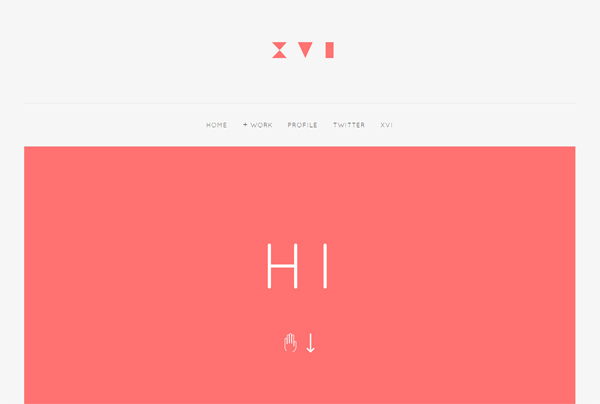
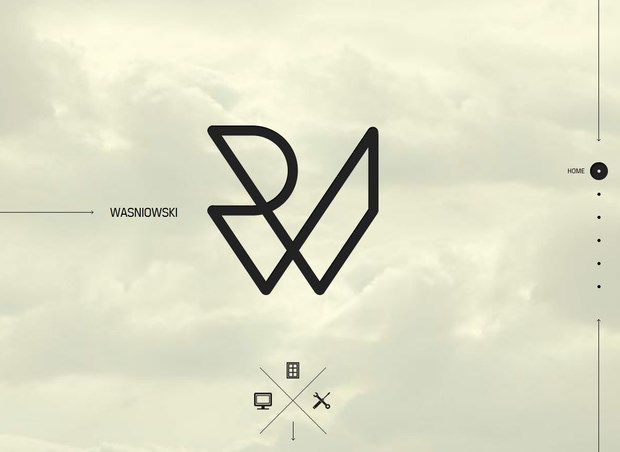
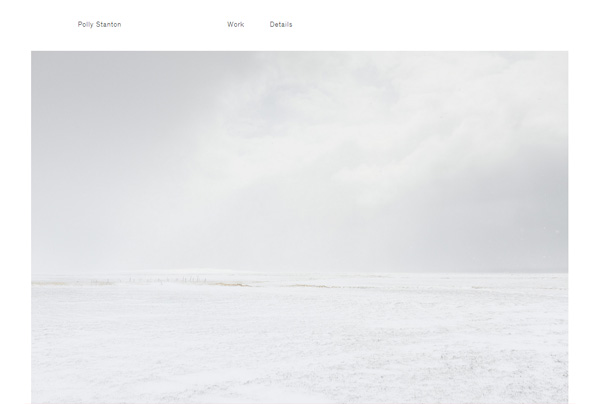
Therefore, I look for some of minimalism design portfolio website. I found few of the design is neat, simple, direct and clean approach.


http://derekboateng.com/


http://wasniowski.de/


http://pollystanton.com/


http://stefivanov.com/


References

Bradley, S. (2011). Why Minimalism is the Most Important Design Style to Master - Vanseo Design. [online] Vanseodesign.com. Available at: http://www.vanseodesign.com/web-design/why-minimalism/ [Accessed 22 Jul. 2014].

Reid, S. (2014). Minimalism Trends in Web Design. [online] Suzanne Reid Design. Available at: http://suzannereiddesign.com/minimalism-web-design/ [Accessed 22 Jul. 2014].

Thursday, July 17, 2014

Feedback


A tutorial section with Shahnim today. I have showed my design visual and Image above was the feedbacks from lecturer. 

Overall design was not showing my own identity. Therefore, lecturer suggested I should study more on portfolio branding.

I had research on what is the essential key of portfolio branding. I found this website provided some of the key elements and potential strategy that as a guide for me to further develop my portfolio website.

Mitch Duckler has share some of the guiding principles of a brand portfolio strategy. There were total up 5 strategies.
In this case, what my understanding from the principles is that to build a portfolio branding, first, I should understand what is the objective can be fulfill for my target audience of my portfolio.I should maximize brand extendibility and provided clear delineation of appropriate benefits for the user. Other that to build strong relationship with others corporate brand, however, this strategy might use in the future. Create visual identity for brands in the portfolio, I should create brand hierarchy, clear organized and simple navigation for the user.


Therefore, I have done a fast SWOT analyses for my as clarify myself in this portfolio website. 

Strengths
(About myself)
- To bear hardship and work hard
- Know abit of backend programming such as html 5, javascript, jquery, css, xml and php.
- Be a successful UI / UX designer + Illustrator
- Willing to take challenge

(About portfolio website)
-Easy access to my portfolio 
-Able to know my identity
-Provide inspiration for other design talent

Weaknesses
- Content deliver might be not convincing
- Webpage overload
- Working time exceed 

Opportunities
- Get recognition from worldwide by just input my url link
- Get more clients, working and get experiences
- Easy and fast to access on what I'm working, who I am and what I offer

Threats
-Given 40 hours to execute
-Technical error
-Unclear content 

However, I will make a change of my design visual and some of the adjustment.


References

Duckler, M. (2014). A Strategic Approach Toward Optimizing a Brand Portfolio. [online] Fullsurge.com. Available at: http://www.fullsurge.com/perspectives/articles/brand/strategic-approach-toward-optimizing-brand-portfolio [Accessed 17 Jul. 2014].

Monday, July 7, 2014

Test code

On 30th June, I have done some of code research for my portfolio in this CFE project. Among some other research, I have found this is more suitable to apply in my project. This website has also provide tutorials file, so that I can refer to the codes and use it to develop further in this portfolio. 


In my portfolio, I wanted it to be a parallax in horizontal website, whereas when user click on the menu, it will slides up and shows buttons. When user click on the one of the buttons it will slide to the specific page.

First of all, I wanted my menu on the bottom of my webpage. However I wanted it to be always stick to the bottom no matter how I zoom in and out, display it into another browser it still stick at the bottom. Therefore I found a tutorial through online. 


Link : http://jsbin.com/aloqad/2/edit
This tutorial is simple and easy to understand. Therefore, by following the codes, I have done my menu bar which it is stick to the bottom.


By referring to the Scrolling cloud reference, I have also done my parallax horizontal with page of 6. For example, when user click on box 3 buttons in the menu bar, the page will auto scroll to the page 3 content page.


Next is I will be doing the menu to slide up when user click on the little triangle. May refer to the sketches bellow. 


When user click on the triangle, menu bar will sliding up for user to choose which page they want to go. Menu buttons will place in a slanting 45 degree position.


From the sketches, when user mouse over the buttons, it will stands out among the others whereas the others buttons will seems to blur out. When user mouse out, the buttons turns to original. To be more clear on what my explanation. This is an example and tutorials that I would like to achieve.

 When mouse out.

Mouse over on one button.


However, before execute in that area. I have tried out some of the codes for sliding up the menu bar but failed. 


When I mouse over the box it doesn't move upwards smoothly but it suddenly jump on the top. I will further examination in this part until I get my result. I also looking for some of the research that could helps me in this part.